OpenClaw Security Checklist: Hardening Your AI Agent Infrastructure
Secure your OpenClaw AI agent infrastructure with this practical security checklist. Covers gateway hardening, firewall configuration, SSH security, fail2ban setup, and automated monitoring. Includes 7 security sections with actionable commands and a free Security Dashboard skill.

I became a member of the OpenClaw 🦞 community way back when it started as ClawdBot. Now, 5 name changes later, here we are. One thing that stuck out to me is the constant hum about security and Open Claw on X and other channels.
Many were complaining that OpenClaw had weak security or that attackers had identified 1000s of open servers running OpenClaw. Well, I set out to get to the bottom of all the noise and make sense of it all.
What I found after installing all 5 names of OpenClaw is the community's misunderstanding of the OpenClaw documentation, best practices generally on running a server in the cloud or on-prem, and finally, not checking and maintaining what is actually running.
So I set out on a mission to provide transparency into the security settings of the running Open Claws server. First, I built a dashboard skill that monitors and alerts me to the current security status and to any important aspect that turns Red.
What I found after installing all 5 OpenClaw names is the community's misunderstanding of the OpenClaw documentation, the general best practices for running a server in the cloud or on-prem, and, finally, not checking or maintaining what is actually running.
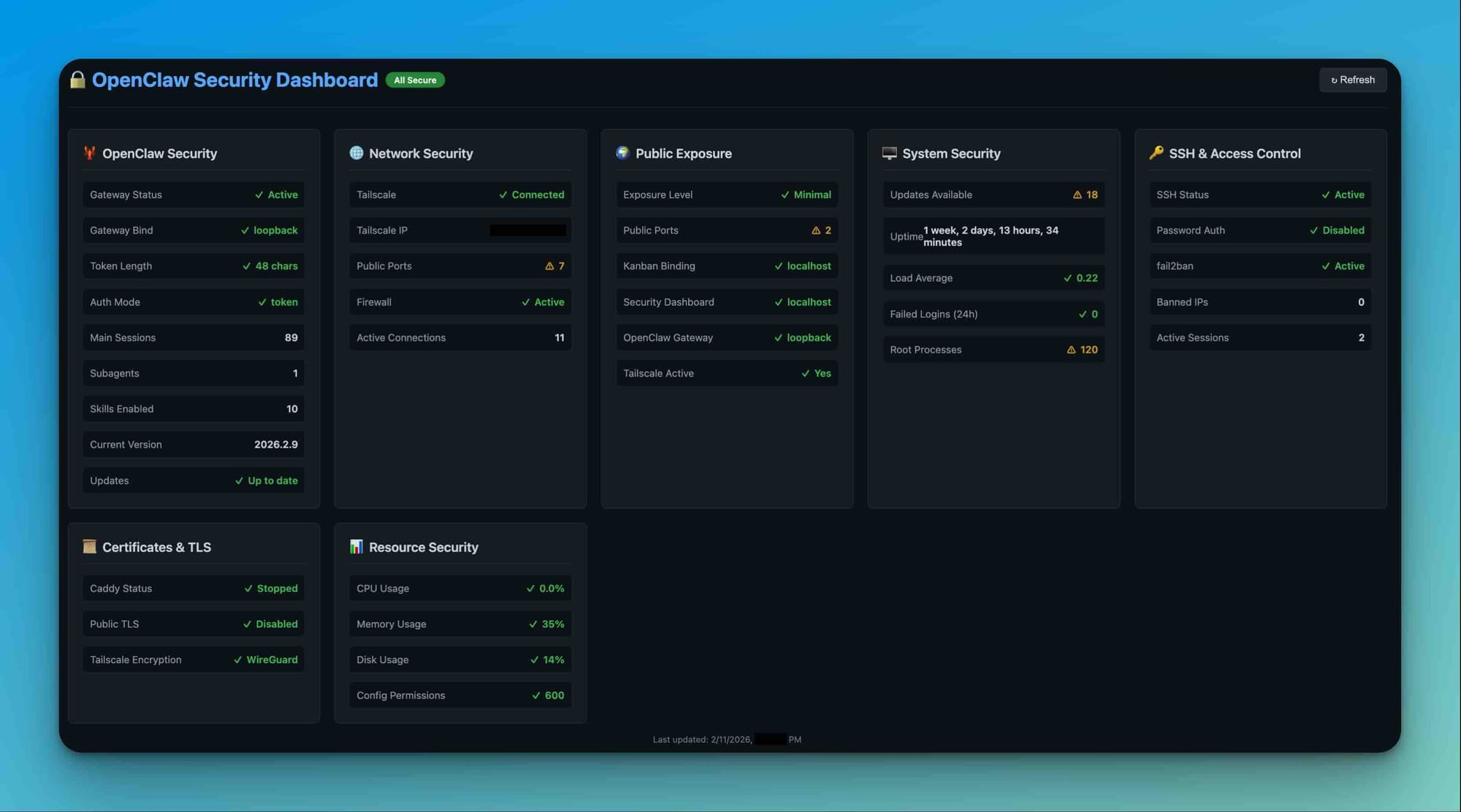
As part of the dashboard's development, I also created a checklist to help you secure your OpenClaw 🦞.
Why This Matters
Running an AI agent on your infrastructure means:
- Credentials at risk: Your agent has access to APIs, databases, and servers, and may also have access to personal information (email, bank information, credit card numbers).
- Attack surface: Public IPs, open ports, and exposed services are targets
- Automation risk: Misconfigurations can propagate quickly across systems
This checklist aligns with the Security Dashboard to catch issues before they become incidents.
🦞 OpenClaw Security
What: Core OpenClaw gateway and authentication
Why: Your gateway is the entry point - weak auth = full system compromise
Checklist
- [ ] OpenClaw runs as a non-root user (not root or sudo)
- [ ] Gateway token is 32+ characters (weak tokens can be brute-forced)
- [ ] Gateway binds to
loopbackor behind firewall (no public exposure) - [ ] Authentication mode is
token(not password-based) - [ ] Config file permissions are
600(owner-only read/write) - [ ] Sessions directory is not world-readable
- [ ] No API keys stored in plaintext config (use environment variables or 1Password)
Why not root?
If OpenClaw is compromised (via a malicious skill, prompt injection, or RCE), the attacker inherits the user's permissions. Running as root = full system access.
Fix it:
# Create dedicated user
sudo useradd -r -m -s /bin/bash openclaw
sudo usermod -aG docker openclaw  # If OpenClaw needs Docker access

# Move config to new user
sudo cp -r ~/.openclaw /home/openclaw/
sudo chown -R openclaw:openclaw /home/openclaw/.openclaw

# Update systemd service to run as openclaw user
# Edit: /etc/systemd/system/openclaw-gateway.service
# Change: User=openclaw

# Generate strong token
openclaw config.patch --raw '{"gateway":{"auth":{"token":"'$(openssl rand -hex 32)'"}}}'

# Secure permissions
chmod 600 ~/.openclaw/openclaw.json
🌐 Network Security
What: Firewall, VPN, and network controls
Why: Open ports without protection = bots, scrapers, and attackers
Checklist
- [ ] Firewall active (UFW or firewalld running)
- [ ] Only SSH port (22) exposed publicly preferrably only Allowed to access the IP's you want
- [ ] Tailscale or WireGuard VPN active for remote access
- [ ] Internal services (dashboards, APIs) bind to localhost only and are accessed over WireGuard
- [ ] Public IP not listed on Shodan with unexpected services
Fix it:
# Enable UFW
sudo ufw default deny incoming
sudo ufw allow 22/tcp
sudo ufw enable

# Install Tailscale (zero-trust VPN)
curl -fsSL https://tailscale.com/install.sh | sh
sudo tailscale up
🌍 Public Exposure
What: What's visible to the internet
Why: Every public port is a potential entry point
Checklist
- [ ] Dashboard services bind to
127.0.0.1(localhost only) - [ ] OpenClaw gateway not accessible without VPN
- [ ] No database ports (3306, 5432, 27017) exposed
- [ ] No internal tools (phpMyAdmin, adminer) on public URLs
- [ ] Cloudflare bot protection enabled (if using Cloudflare)
Check it:
# See what's publicly bound
ss -tlnp | grep -E '0\.0\.0\.0|:::'

# Should only show SSH
Fix it:
# Bind services to localhost
# Edit server config: listen 127.0.0.1:PORT instead of 0.0.0.0:PORT
🖥️ System Security
What: OS-level hardening
Why: Outdated software = known exploits
Checklist
- [ ] System updates installed (fewer than 20 pending)
- [ ] Automatic security updates enabled
- [ ] No unnecessary services running (
systemctl list-units --type=service) - [ ] Disk usage below 80% (prevents DoS via disk fill)
- [ ] Load average is healthy (< number of CPU cores)
Fix it:
# Update system
sudo apt update && sudo apt upgrade -y

# Enable automatic security updates
sudo apt install unattended-upgrades
sudo dpkg-reconfigure -plow unattended-upgrades
🔑 SSH & Access Control
What: Remote access security
Why: SSH is the #1 target for brute-force attacks
Checklist
- [ ] SSH password authentication disabled (key-only)
- [ ] fail2ban active (blocks brute-force attempts)
- [ ] Root login disabled (
PermitRootLogin no) - [ ] SSH keys are 4096-bit RSA or Ed25519
- [ ] No banned IPs from legitimate sources (check fail2ban status)
- [ ] Fewer than 10 failed login attempts in 24 hours
Fix it:
# Disable password auth (in /etc/ssh/sshd_config)
PasswordAuthentication no
PubkeyAuthentication yes
PermitRootLogin no

# Restart SSH
sudo systemctl restart sshd

# Install and enable fail2ban
sudo apt install fail2ban
sudo systemctl enable fail2ban
sudo systemctl start fail2ban
📜 Certificates & TLS
What: Encryption for web services
Why: Unencrypted = credentials sent in plaintext
Checklist
- [ ] No Caddy or nginx exposed publicly (unless intentional)
- [ ] Tailscale provides WireGuard encryption (no TLS needed for internal tools)
- [ ] If using public HTTPS, certificates are valid and auto-renewing
- [ ] No self-signed certificates for production services
Why localhost-only is secure:
- Tailscale uses WireGuard (industry-standard encryption) to allow access to OpenClaw securely over the WireGuard VPN
- No certificate management hassles
- Zero-trust model: only your devices can access
📊 Resource Security
What: Performance and capacity monitoring
Why: Resource exhaustion = downtime or security bypass
Checklist
- [ ] CPU usage typically below 80%
- [ ] Memory usage below 80%
- [ ] Disk usage below 80%
- [ ] Config file permissions are
600(not644or777) - [ ] Log rotation enabled (prevents disk fill)
Fix it:
# Check permissions
stat -c "%a" ~/.openclaw/openclaw.json  # Should be 600

# Fix if needed
chmod 600 ~/.openclaw/openclaw.json
Automation: Security Dashboard + Cron
Your Security Dashboard monitors all of the above in real-time.
Automated Checks (4x Daily)
- 06:00 UTC - Morning check
- 12:00 UTC - Midday check
- 18:00 UTC - Evening check
- 00:00 UTC - Midnight check
Critical alerts trigger immediately for:
- Firewall inactive
- fail2ban inactive
- Weak gateway token
- SSH password auth enabled
- Insecure file permissions
Install the dashboard:
cd /root/clawd/skills/security-dashboard
./scripts/install.sh
Access it:
ssh -L 18791:localhost:18791 root@YOUR_SERVER_IP
# Visit: http://localhost:18791
Quick Win Checklist
Start here if you're overwhelmed:
- ✅ Enable firewall:
sudo ufw enable - ✅ Enable fail2ban:
sudo apt install fail2ban && sudo systemctl enable fail2ban - ✅ Disable SSH password auth (edit
/etc/ssh/sshd_config) - ✅ Update system:
sudo apt update && apt upgrade -y - ✅ Fix config permissions:
chmod 600 ~/.openclaw/openclaw.json - ✅ Install Tailscale:
curl -fsSL https://tailscale.com/install.sh | sh - ✅ Install Security Dashboard: https://clawhub.ai/vegasbrianc/security-dashboard
Time investment: ~20 minutes
Protection level: Blocks 95% of automated attacks
Going Further
Paid Checklist ($49, coming soon):
- Intrusion detection with Wazuh
- Log aggregation and alerting
- Rate limiting for APIs
- Backup automation and disaster recovery
- Compliance checklists (SOC 2, GDPR)
- Custom firewall rules for your stack
Security Audit ($1,500):
- Full infrastructure review
- Penetration testing
- Custom security policies
- Implementation assistance
- 30-day follow-up
Resources
Get Started
Try the Security Dashboard skill:
- Install: ClawdHub - Security Dashboard